
Most Shopify store owners assume that installing more tools will automatically increase conversion rates. In reality, many stores end up slower, more cluttered, and still struggling to turn visitors into customers.
The problem isn’t a lack of tools—it’s using them without a clear strategy. It’s about using the right tools, at the right time, in the right place within your store.
In this guide, you’ll learn exactly how that works. We’ll break down where conversion actually happens across your Shopify store, what “good” performance looks like based on real benchmarks, and most importantly, which tools to use at each stage of the funnel.
By the end, you’ll know:
- When your store actually needs CRO tools
- Where to focus your optimization efforts on Shopify
- Which tools can help you improve conversion at each stage of the customer journey
No fluff—just a clear, practical way to turn traffic into sales.
Table of Contents
Shopify Conversion Rate Benchmarks 2026
| Category | Metric | Benchmark | Notes | Source |
| Overall Conversion Rate | Average (Shopify) | ~1.4% – 2.5% | Typical range for most stores | Littledata |
| Top 20% stores | ~3.2%+ | Well-optimized stores | Littledata | |
| Top 10% stores | ~4.7%+ | High-performing stores | Littledata | |
| By Industry | Fashion / Apparel | ~1% – 2% | Browsing-heavy behavior | IRP Commerce / Smart Insights |
| Shoes / Footwear | ~1% – 2% | Similar to fashion, size/fit friction | IRP Commerce (category overlap) | |
| Beauty / Skincare | ~2% – 4% | Higher trust & repeat purchases | IRP Commerce | |
| Wellness / Supplements | ~2% – 4% | Strong intent + repeat buying | Smart Insights (health category) | |
| Food & Beverage | ~3% – 5% | High purchase intent | IRP Commerce | |
| Pets / Pet products | ~2% – 4% | Loyal buyers, repeat purchases | no strong public benchmark, inferred from retail data | |
| Art / Handmade | ~0.5% – 1.5% | Emotional purchase, low urgency | no standardized benchmark | |
| High-ticket products | ~0.5% – 1.5% | Longer decision cycle | Smart Insights | |
| By Funnel Stage | Add-to-cart rate | ~4% – 10% | Reflects product page effectiveness | Littledata |
| Checkout completion rate | ~30% – 60% | Cart abandonment ~70% | Baymard Institute | |
| Product page conversion | ~2% – 5% | Average e-commerce rate | Cro Benchmarks | |
| By Device | Desktop | ~2.8% – 3.5% | Higher conversion rate | Statista / Smart Insights |
| Mobile | ~1.5% – 2.3% | Lower conversion, higher traffic | Statista |
What is a Good Conversion Rate on Shopify?
Most store owners look at their conversion rate and immediately think in binary terms: good or bad. In reality, conversion rate only makes sense when placed in context.
A store converting at 2% might be perfectly average, but depending on the industry, it could also mean significant missed revenue. The difference between an average store and a top-performing one is often more than double, and that gap rarely comes from traffic. It comes from optimization.
Before making any changes, the first step is to understand where your store sits within realistic benchmarks, not ideal numbers.
Shopify Conversion Rates Vary by Industry
One of the most common mistakes is benchmarking against the wrong category.
Conversion rates vary significantly depending on what you sell. Fashion and footwear stores naturally convert lower due to browsing behavior and sizing friction. On the other hand, beauty, wellness, or consumable products tend to convert higher because of repeat purchases and stronger intent.
If you’re selling high-ticket products or art, a lower conversion rate is not necessarily a problem—it’s part of the buying process.
What matters is not hitting a universal number, but understanding whether your performance is aligned with your business model.
How Conversions Happen Across Your Shopify Store Pages
Your overall conversion rate is just the result of several smaller steps.
If you only look at the final number, you miss where the real issue is.
- A low add-to-cart rate usually points to problems on the product page
- A high cart abandonment rate often indicates friction at checkout
- A normal overall conversion rate can still hide weak performance in one stage
This is where most optimization efforts fail—they try to improve everything at once instead of identifying the weakest point in the funnel.
The goal is not to increase conversion rates everywhere. It’s to fix the one step that’s underperforming the most.
Mobile vs Desktop Conversion Rate on Shopify
Traffic distribution and conversion behavior are not the same thing.
Most Shopify stores today get a large share of traffic from mobile devices, but mobile users convert at a significantly lower rate than desktop users. This gap is not accidental—it reflects real usability issues.
Mobile users deal with smaller screens, slower load times, and more friction in navigation and checkout. As a result, even a well-designed store on desktop can underperform heavily on mobile.
If your traffic is primarily mobile but your conversions are not, this is often one of the first areas to investigate.
Identify the Real Problem Before Adding Tools
Benchmarks are not meant to tell you what to fix—they help you figure out where to look.
If your store is below average, that’s a signal—not a solution. You still need to understand why.
- Are users leaving before adding products to cart?
- Are they dropping off during checkout?
- Is mobile dragging down your overall performance?
Each of these problems requires a completely different approach.
This is why installing more tools without diagnosis rarely works. Tools are not shortcuts—they are amplifiers. They only become effective when applied to the right problem.
Top Recommended Shopify CRO Tools by Stage
Stage 1 — Understanding Why Users Don’t Convert
At this stage, the goal is not to optimize—it’s to observe.
Many Shopify store owners jump straight into changing layouts, adding apps, or tweaking copy. But without understanding how users actually behave, those changes are just guesswork.
If your conversion rate is low, or users are landing on your store and leaving quickly, the problem is not necessarily your product—it’s that you don’t yet know where and why they drop off.
This is where behavior analytics tools become essential. They help you move from assumptions to real data by showing exactly how users interact with your store.
Best Tools for Behavior Analytics
Hotjar
Best for: All-in-one behavior tracking (heatmaps + recordings + surveys)
- Click, scroll, and move heatmaps
- Session recordings to watch real user behavior
- On-site surveys to understand intent
Why it stands out:
Hotjar is one of the easiest tools to start with and gives a complete picture of user behavior without complex setup.
When to use:
- You don’t know why users are leaving
- You want both quantitative (heatmaps) and qualitative (recordings) insights
Microsoft Clarity
Best for: Free, high-volume session recording & heatmaps
- Unlimited session recordings (free)
- Rage clicks, dead clicks detection
- Scroll and click heatmaps
Why it stands out:
Clarity is extremely powerful for a free tool and works well for stores with high traffic where you want to analyze behavior at scale.
When to use:
- You want to analyze large amounts of user sessions
- You need a free alternative without sacrificing core features
Lucky Orange
Best for: Real-time behavior tracking + live insights
- Live visitor tracking
- Session recordings
- Conversion funnels and chat integration
Why it stands out:
Lucky Orange adds a layer of real-time visibility, allowing you to see what users are doing on your store as it happens.
When to use:
- You want to monitor user behavior in real time
- You want a mix of analytics + engagement (chat)
Stage 2 — Testing What Actually Works
Once you understand where users drop off, the next step is to figure out what actually improves conversion.
At this stage, the goal is no longer analysis—it’s validation.
Most Shopify stores make changes based on intuition: redesigning product pages, tweaking CTAs, or adjusting pricing. But without testing, there’s no way to know whether those changes improve performance or make things worse.
This is where A/B testing becomes essential.
Instead of guessing, you compare two versions of the same element—page layout, CTA, pricing, or offer—and let real user behavior determine the winner.
Best A/B Testing Tools for Shopify
Intelligems
Best for: Pricing, offers, and checkout testing
- A/B test pricing, discounts, bundles
- Test shipping thresholds and offers
- Works directly inside Shopify
Why it stands out:
Intelligems focuses on revenue-impacting tests, not just UI changes. It’s especially powerful for testing what actually affects buying decisions.
When to use:
- You want to optimize pricing or promotions
- You already have consistent traffic
Shoplift
Best for: Visual A/B testing for product pages
- No-code visual editor
- Test layouts, sections, and content
- Built specifically for Shopify
Why it stands out:
Shoplift is one of the few tools designed specifically for Shopify storefront testing, making it easier to experiment without developers.
When to use:
- You want to test product page design
- You’re optimizing UX and layout
VWO
Best for: Advanced experimentation across the entire site
- A/B testing + behavior analytics
- Advanced targeting and segmentation
- Works across multiple pages and flows
Why to consider:
External tools like VWO offer more flexibility, but they also require:
- More setup
- More technical integration
- Potential performance impact
When to use:
- You need advanced experimentation
- Your store is already scaling
What You Should Test First
Don’t test randomly. Focus on high-impact elements:
- Product page layout (images, CTA, trust signals)
- Add-to-cart button (position, wording, color)
- Pricing and offers (discounts, bundles, free shipping)
- Checkout friction (steps, clarity, form fields)
Stage 3 — Optimizing Product Pages (Highest Impact Area)
If there’s one place where small changes can drive the biggest impact on revenue, it’s your product page.
At this stage, you’re no longer trying to understand behavior or test ideas—you’re applying what works to the page that actually converts visitors into buyers.
Most Shopify stores don’t struggle with traffic. They struggle with turning product views into purchase intent.
If your store has decent traffic but low sales, or if users land on product pages but don’t add items to cart, the issue is almost always here. This is where conversion is either won—or lost.
When to Focus on Product Page Optimization
- You have consistent traffic but low sales
- Your add-to-cart rate is below ~4–5%
- Users spend time on product pages but don’t take action
These are clear signals that your product page is not doing its job:
convincing users to move forward.
Best Product Page Optimization Tools
PageFly
Best for: Customizing product page layouts without coding
- Drag-and-drop builder for product pages
- Pre-built templates optimized for conversion
- Flexible layout control (sections, spacing, hierarchy)
Why it stands out:
PageFly allows you to quickly test and implement high-converting layouts without relying on developers. This is especially useful when applying insights from A/B testing.
When to use:
- You want more control over product page structure
- Your current theme feels too restrictive
Loox
Best for: Building trust through visual social proof
- Photo and video reviews
- Automated review requests
- Customizable review display
Why it stands out:
Reviews are one of the strongest conversion drivers. Loox makes them more persuasive by adding visual proof, not just text.
When to use:
- Your product lacks trust signals
- Users hesitate before adding to cart
TinyIMG
Best for: Improving speed and image performance
- Automatic image compression
- Lazy loading
- SEO optimization for images
Why it stands out:
Heavy images are one of the biggest reasons product pages load slowly, especially on mobile. TinyIMG helps improve performance without sacrificing quality.
When to use:
- Your product pages load slowly
- Mobile conversion is low
The Role of Your Shopify Theme (Often Overlooked)
While apps can enhance your product page, the foundation still comes from your theme.
A well-optimized Shopify theme like Neat or Unity already includes:
- Clear visual hierarchy
- Strong CTA placement
- Mobile-friendly layout
- Fast loading performance
This means you don’t always need more apps—you need a better structure. Many high-converting stores rely on Shopify themes designed specifically for conversion, rather than stacking multiple apps to fix layout issues.
Stage 4 — Increasing Add-to-Cart & Order Value
Once your product page is converting, the next step is to increase how much each customer adds to cart and how much they spend per order.
At this stage, the goal is not just to get users to buy, but to maximize the value of each transaction.
Most Shopify stores leave money on the table here. A customer might be ready to purchase, but without the right prompts, they’ll only buy a single product or abandon the cart entirely.
This is where strategic upsells, cross-sells, and incentives make a direct impact on revenue.
When to Focus on Add-to-Cart & Order Value Optimization
You should focus on this stage if:
- Your add-to-cart rate is decent, but revenue is still low
- Your average order value (AOV) is low
- Customers typically purchase only one product per order
These are clear signs that users are converting—but not maximizing their purchase.
Best Tools for Increasing Add-to-Cart & Order Value
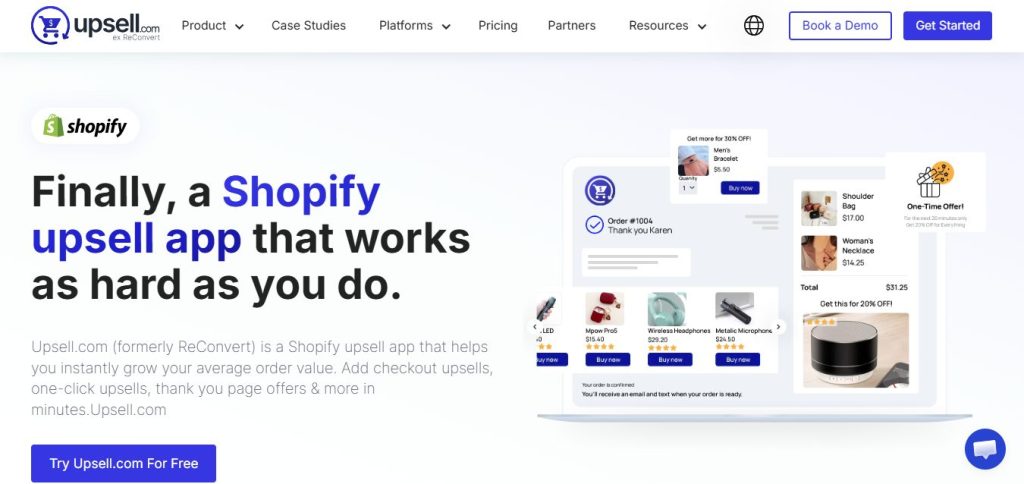
ReConvert
Best for: Post-purchase upsells and increasing AOV
ReConvert allows you to add upsell offers directly after checkout, when customers are most likely to accept additional purchases.
- One-click upsells after purchase
- Custom thank-you page offers
- Works without interrupting the checkout flow
Why it stands out:
It captures revenue after the initial purchase decision, which is often the easiest moment to increase order value.
Frequently Bought Together
Best for: Product bundling and cross-sells
This app suggests complementary products directly on the product page using a familiar “bundle” format.
- AI-driven product recommendations
- One-click add-to-cart bundles
- Proven UX pattern (similar to Amazon)
Why it stands out:
It increases both add-to-cart rate and AOV by showing customers what to buy together—removing decision friction.
Vitals
Best for: Multiple conversion features in one app
Vitals combines several CRO tools, including:
- Upsell and cross-sell features
- Trust badges
- Cart incentives (free shipping, discounts)
Why it stands out:
Instead of installing multiple apps, Vitals lets you test different strategies in one place—while keeping your store lightweight.
What Actually Increases Add-to-Cart & AOV
Tools alone don’t increase revenue—strategy does.
To improve performance at this stage, focus on:
- Showing relevant product recommendations (not random ones)
- Bundling complementary products together
- Offering incentives (e.g., free shipping thresholds)
- Reducing friction in adding multiple items to cart
Stage 5 — Fixing Checkout Drop-Off
By the time a customer reaches checkout, they’ve already decided they want your product.
And yet, this is where a large percentage of potential revenue disappears.
Cart abandonment is one of the biggest conversion leaks in any Shopify store. Users add items to cart, start the checkout process, and then leave before completing the purchase.
In most cases, this doesn’t happen because they changed their mind. It happens because of friction:
- Unexpected costs (shipping, taxes)
- Too many steps or required fields
- Lack of trust signals
- Limited payment options
- Poor mobile experience
This stage is where the most revenue is “left on the table.”
When to Focus on Checkout Optimization
You should prioritize checkout optimization if:
- A large number of users add products to their cart but don’t complete the purchase
- Your checkout completion rate is below ~30–40%
- You see a clear drop-off between cart and payment
At this point, the issue is no longer about product appeal—it’s about removing friction at the final step.
Best Checkout Optimization Tools
Checkout Blocks
Best for: Customizing checkout experience (Shopify Plus)
- Add trust badges, banners, and custom messages
- Highlight shipping information or urgency
- Customize checkout UI elements
Why it stands out:
Checkout Blocks is one of the few apps that allows direct checkout customization in Shopify (for Plus users), helping reduce friction by making key information clearer.
When to use:
- You’re on Shopify Plus
- You want to improve trust and clarity inside checkout
Rebuy Personalization Engine
Best for: Optimizing cart and checkout flow with personalization
- AI-driven product recommendations
- Upsell offers in cart and checkout
- Dynamic content based on user behavior
Why it stands out:
Rebuy keeps users engaged during the checkout process by increasing perceived value and reducing hesitation.
When to use:
- You want to improve both conversion rate and AOV
- Your store already has consistent traffic
Klaviyo
Best for: Recovering abandoned checkouts
- Automated abandoned cart emails
- SMS reminders for unfinished purchases
- Personalized recovery flows
Why it stands out:
Not every customer completes checkout on the first visit. Klaviyo helps you recover lost revenue by bringing them back.
When to use:
- You have noticeable cart abandonment
- You want to capture revenue that would otherwise be lost
Stage 6 — Personalization & Conversion Boosting
Once your store has consistent traffic and a stable conversion flow, the next level is not just improving performance—it’s making the experience more relevant.
At this stage, showing the same content to every visitor becomes a limitation. Different users have different intent:
- New visitors need trust and clarity
- Returning visitors need incentives or reminders
- High-intent users need speed and convenience
Instead of optimizing for everyone, you start optimizing for each type of user.
This is where personalization makes the biggest difference. By adapting content, offers, and recommendations based on behavior, you reduce decision friction and make it easier for users to move forward.
The goal is simple: right user → right product → right moment
Best Personalization Tools
Rebuy Personalization Engine
Best for: Real-time personalization across product, cart, and checkout
Key features:
- AI-driven product recommendations
- Dynamic upsell and cross-sell widgets
- Personalized cart and checkout experiences
Why it stands out:
Rebuy adapts your store experience in real time based on user behavior, making every interaction more relevant without manual setup.
When to use:
- You want to increase both conversion rate and AOV
- You already have consistent traffic and data
Nosto
Best for: Advanced personalization and audience segmentation
Key features:
- Personalized product recommendations
- Dynamic content (banners, popups, on-site elements)
- Behavior-based segmentation
Why it stands out:
Nosto allows you to personalize not just products, but entire sections of your store for different user groups, making the experience feel tailored.
When to use:
- You want deeper segmentation and targeting
- Your store has enough traffic to benefit from personalization logic
LimeSpot Personalizer
Best for: Easy-to-implement recommendation engine
Key features:
- Smart product recommendations
- Personalized bundles and upsells
- Multi-channel personalization (web, email)
Why it stands out:
LimeSpot is easier to set up than more advanced tools while still delivering strong personalization results.
When to use:
- You want quick wins without complex setup
- You’re just starting with personalization
Stage 7 — Speed & Performance Optimization
At this stage, the issue is no longer about design, offers, or personalization—it’s about performance.
Even a well-optimized store will struggle to convert if it loads slowly. Speed directly affects user experience, especially on mobile, where delays are more noticeable, and patience is lower.
If your pages take too long to load, users don’t wait—they leave. In eCommerce, speed is not just a technical metric. It’s a conversion factor.
When to Focus on Speed Optimization
You should prioritize performance if:
- Your site loads slowly (especially on mobile)
- Your mobile conversion rate is significantly lower than desktop
- Users bounce quickly without interacting
In many cases, stores lose conversions not because of poor design, but because users never stay long enough to experience it.
Best Speed Optimization Tools
TinyIMG
Best for: Image compression and performance improvement
Key features:
- Automatic image compression
- Lazy loading
- SEO optimization for images
Why it stands out:
Images are often the heaviest elements on Shopify stores. TinyIMG reduces load time without sacrificing quality, especially important for mobile users.
When to use:
- Your product pages are image-heavy
- Page load speed is slow
PageSpeed Insights
Best for: Diagnosing performance issues
Key features:
- Core Web Vitals analysis
- Mobile vs desktop performance reports
- Detailed recommendations for improvement
Why it stands out:
PageSpeed Insights doesn’t fix issues—but it tells you exactly what’s slowing your site down.
When to use:
- You want to identify performance bottlenecks
- You need actionable insights before optimizing
Booster SEO & Image Optimizer
Best for: All-in-one speed + performance optimization
Key features:
- Image compression
- Script optimization
- Page speed improvements
Why it stands out:
Booster combines multiple optimization functions into one app, helping reduce load time without installing multiple tools.
When to use:
- You want a simple, all-in-one solution
- You’re optimizing both speed and SEO
Stage 8 — Automation & Scaling Conversion
Once your store is optimized, tested, and performing well, the next challenge is scale.
At this stage, the goal is no longer to manually tweak every part of your store—it’s to systemize and automate what already works.
Because as traffic grows, manual optimization doesn’t scale:
- You can’t manually follow up every abandoned cart
- You can’t personalize every user in real time
- You can’t optimize every step continuously
That’s where automation becomes critical.
Instead of reacting, your store starts working proactively—triggering the right actions at the right time without manual effort.
When to Focus on Automation
You should invest in automation if:
- Your store already has stable traffic and conversions
- You’re repeating the same optimization tasks manually
- You want to scale revenue without increasing workload
At this point, the bottleneck is no longer conversion strategy—it’s execution at scale.
Best Automation Tools for Shopify
Shopify Flow
Best for: Automating backend workflows and logic
Key features:
- Trigger-based automation (orders, customers, inventory)
- Custom workflows without coding
- Integration with other Shopify apps
Why it stands out:
Shopify Flow allows you to automate repetitive tasks and create logic-based workflows that run in the background.
When to use:
- You want to automate operations and customer actions
- You’re scaling and need efficiency
Klaviyo
Best for: Automated customer journeys and retention
Key features:
- Abandoned cart and browse abandonment flows
- Post-purchase follow-ups
- Segmentation and personalized messaging
Why it stands out:
Klaviyo turns one-time interactions into ongoing customer relationships through automated flows.
When to use:
- You want to increase repeat purchases
- You want to recover and retain customers automatically
Omnisend
Best for: Multi-channel automation (email + SMS + push)
Key features:
- Pre-built automation workflows
- Cross-channel messaging (email, SMS, push notifications)
- Behavior-based triggers
Why it stands out:
Omnisend simplifies automation across multiple channels, making it easier to scale communication without complexity.
When to use:
- You want an all-in-one automation platform
- You’re scaling marketing efforts across channels
Common Mistakes When Using Shopify CRO Tools
After going through all the stages, it’s easy to assume that adding more tools will automatically improve your conversion rate. In reality, most Shopify stores don’t struggle because they lack tools—they struggle because they use them the wrong way.
Before adding anything new, it’s important to avoid the most common mistakes that can limit your results or even hurt performance.
Using Tools Before Understanding the Problem
One of the most common mistakes is jumping straight into tools without clearly identifying what needs to be fixed.
Store owners often install heatmaps, A/B testing tools, or personalization apps without knowing where users are dropping off or what is causing the issue. As a result, they end up making random changes that don’t improve conversion.
Conversion rate optimization is not about adding features. It’s about solving specific problems.
If you don’t understand where users struggle in your store, no tool will be able to fix it.
Installing Too Many Apps and Slowing Down Your Store
Another common mistake is stacking multiple apps in an attempt to improve conversion.
Upsell tools, popups, banners, and widgets can quickly add up. Instead of improving performance, they often create new problems:
- Slower load times
- Cluttered layouts
- A more confusing user experience
Performance and simplicity are critical for conversion. Adding too many apps can directly hurt both.
Instead of installing more tools, focus on using a small number of tools that serve a clear purpose and work well together.
Not Measuring the Impact of Changes
Many stores make changes but never track whether those changes actually improve results.
You might redesign a product page, install a new app, or adjust your checkout flow—but without measuring performance, you won’t know if those changes helped or made things worse.
Every change should be tied to a clear metric, such as:
- Conversion rate
- Add-to-cart rate
- Checkout completion rate
- Average order value
Without measurement, optimization becomes guesswork again.
Final Thought,
Shopify conversion rate optimization isn’t about quick fixes—it’s about understanding where your store stands and improving it step by step.
From analyzing user behavior to optimizing product pages, increasing AOV, fixing checkout drop-off, and scaling with personalization, each stage plays a specific role. Skipping steps or rushing into tools too early often leads to wasted effort.
Tools, apps, and themes can help—but only when used appropriately. They should support your strategy, not replace it. A well-built theme, a few carefully chosen apps, and the right tools at each stage are more effective than stacking everything at once.
Most importantly, CRO is an ongoing process. You need to continuously test, measure, and adjust to understand what works and where your store is performing well—or underperforming.
That’s how you turn optimization into consistent growth.