
According to Baymard Institute, the average e-commerce cart abandonment rate is 70.22%, meaning roughly 7 out of 10 shoppers who add products to their cart leave without completing their purchase. While some abandonments are inevitable, such as customers who are simply browsing, many are caused by avoidable friction during the shopping and checkout experience.
For many Shopify merchants, the first reaction is to install another app: a sticky cart, countdown timer, exit-intent popup, or cart recovery tool. But adding more apps doesn’t always solve the problem. In fact, it can slow down your storefront, clutter the user experience, and introduce even more friction.
The good news is that you don’t need another app to reduce cart abandonment. Many of the biggest conversion improvements come from features you already have—your Shopify theme and native Shopify settings. In this guide, you’ll learn practical, app-free strategies to create a faster, smoother shopping experience that encourages more shoppers to complete their purchase.
Table of Contents
Why Do Customers Abandon Their Shopify Cart?
Not every abandoned cart is a lost opportunity. According to Baymard Institute, 43% of shoppers say they’ve abandoned a cart simply because they were just browsing or weren’t ready to buy, a behavior that’s difficult to prevent.
That being said, many other abandonments occur due to friction that merchants can fix. When excluding the “just browsing” segment, Baymard’s research identifies these as the most common reasons shoppers leave before completing their purchase:
- 39% abandon their cart because extra costs, such as shipping fees, taxes, or other charges, are higher than expected.
- 21% leave because the delivery is too slow.
- 19% don’t trust the site enough to enter their credit card information.
- 19% abandon checkout because they’re required to create an account.
- 18% give up because the checkout process is too long or complicated.
The encouraging part is that most of these issues don’t require another Shopify app to solve. Better checkout settings, a faster theme, clearer shipping information, and a more trustworthy shopping experience can remove much of the friction that prevents customers from completing their purchase. The strategies below focus on exactly those improvements.
How to Reduce Shopify Cart Abandonment: A Complete Guide
Step 1: Choose a Conversion-Focused Shopify Theme
In fact, every additional app may introduce extra JavaScript, CSS, or external requests that increase page load times and create unnecessary complexity. Some apps also overlap in functionality, resulting in multiple popups, conflicting widgets, or a cluttered interface that distracts shoppers instead of guiding them toward a purchase.
A better approach is to start with the best Shopify themes for conversion that already include the features you need. By choosing a theme with built-in functionality, you can control how customers browse products, add items to their cart, navigate your store, and ultimately reach checkout.
When evaluating a Shopify theme, look for features such as:
- Cart drawer: lets shoppers review and update their cart without leaving the current page.
- Sticky Add to Cart: keeps the purchase action visible as customers scroll.
- Quick Buy: reduces the number of steps between product discovery and checkout.
- Announcement bars for highlighting free shipping thresholds, promotions, or limited-time offers.
- Mobile-first layouts: make browsing and purchasing effortless on smaller screens.
- Fast-loading architecture: minimize delays and keep the shopping journey responsive.
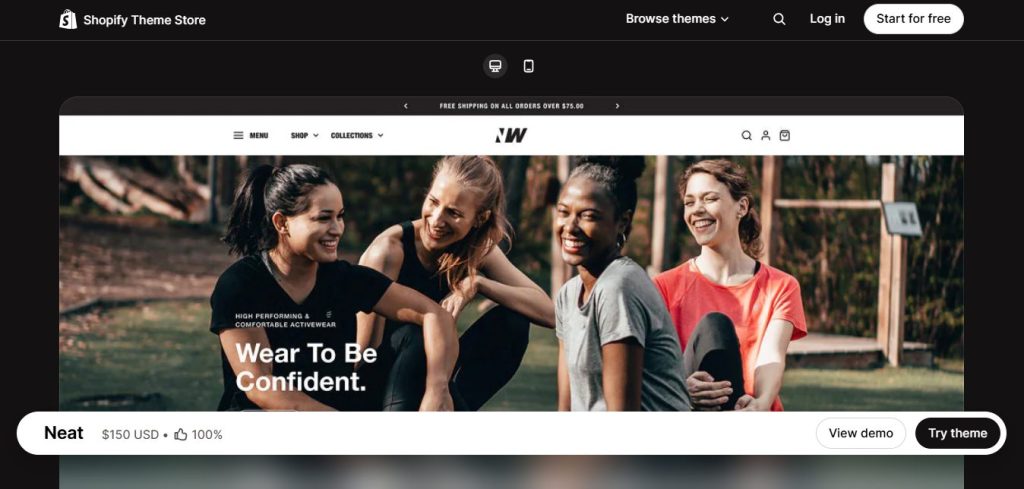
Neat, a minimal Shopify theme built for conversions, is an ideal choice for merchants who are looking for a clean, lightweight design with built-in features like a cart drawer, sticky Add to Cart, Quick Buy, and announcement bars. The theme provides a streamlined foundation that makes it easier to optimize the customer journey and encourages more shoppers to complete their purchases.
Step 2: Make the Shopping Journey Faster
The fewer interruptions customers encounter while shopping, the more likely they are to reach checkout. Small UX improvements, such as reducing clicks, keeping key actions visible, and removing distractions, can make the buying journey feel faster and more seamless.
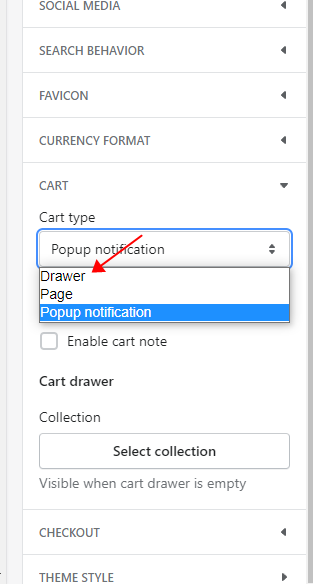
Replace the Cart Page with a Cart Drawer (Slide-out cart)
Switching from a traditional cart page to a cart drawer lets shoppers review their cart and continue browsing without leaving the current page, creating a smoother shopping experience.
Most Online Store 2.0 Shopify themes already include a built-in cart drawer, so there’s usually no need to install a separate app. This includes Shopify’s own themes, with Dawn and Refresh being two popular examples.
Enable Sticky Add to Cart
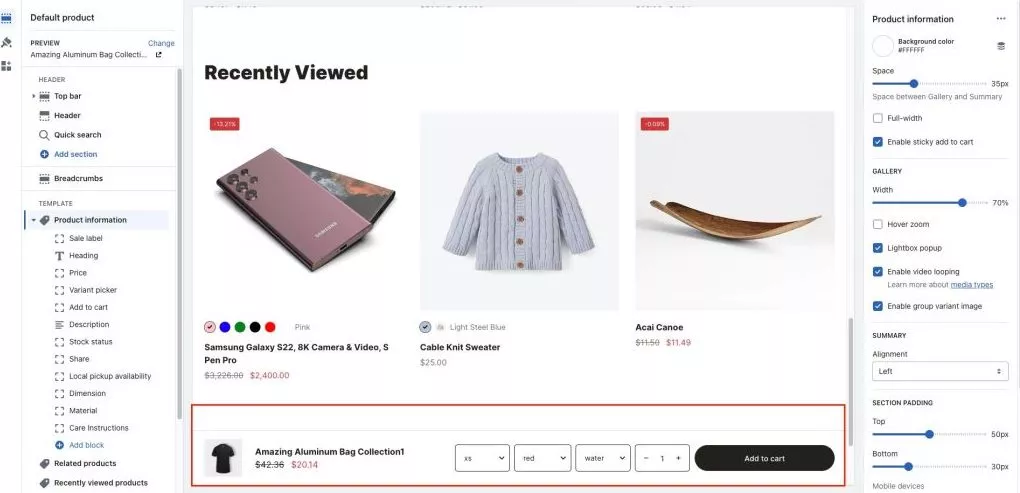
A Sticky Add to Cart button keeps the purchase action visible as shoppers scroll through product images, descriptions, and reviews. This is particularly helpful on mobile devices where long product pages can make the standard Add to Cart button difficult to access.
Most modern Shopify themes already support features like Cart Drawer and Dynamic Checkout Buttons, but Sticky Add to Cart isn’t always included. If you’re planning to upgrade your theme, it’s worth looking for one that offers this feature out of the box. You can refer to these themes.
You can find this feature in the Neat theme. On the product page, let’s access Product information > Enable Sticky add to cart. You’ll find the full guide here: Neat Sticky add to cart.
Remove Unnecessary Distractions
Popups and promotional banners can work well on homepages and landing pages, but once shoppers are on a product page or in the cart, avoid competing for their attention. At this stage, every unnecessary interruption increases the chance they’ll abandon their purchase.
Step 3: Simplify the Checkout Process
The checkout experience should be as quick and effortless as possible. Every unnecessary field, missing payment option, or extra step increases the chance that customers will leave before completing their purchase.
Reduce Form Friction
Review your checkout settings and remove any fields you don’t actually need. For example, hide the Company Name field if you don’t sell to businesses, and avoid collecting optional information that doesn’t support order fulfillment.
While you’re there, enable Address Autocomplete to help customers fill in their shipping details faster and with fewer errors.
Enable Accelerated Checkout
Ensure express payment methods like Shop Pay, Apple Pay, Google Pay, and PayPal are fully enabled. If your Shopify theme supports Dynamic Checkout Buttons, turn them on directly on your product pages. This allows eligible customers to skip the traditional cart step and jump straight to express checkout.
Optimize Shopify’s Native Abandoned Checkout Emails
Shopify includes built-in abandoned checkout recovery emails, so there’s no need to install a separate app for basic cart recovery. Customize the email subject line and copy to match your brand, and send the first reminder within 1–2 hours after abandonment. If appropriate, consider including a limited-time discount to encourage hesitant shoppers to complete their purchase.
Step 4: Remove Purchase Hesitation
Even after customers have decided to buy, uncertainty can cause them to abandon their cart. Being transparent about costs, delivery, and store policies helps shoppers feel more confident before completing their purchase.
Show Shipping Costs Early
Whenever possible, display shipping costs before customers reach the final checkout step. This helps eliminate pricing surprises and allows shoppers to make informed purchasing decisions.
Set a Free Shipping Threshold
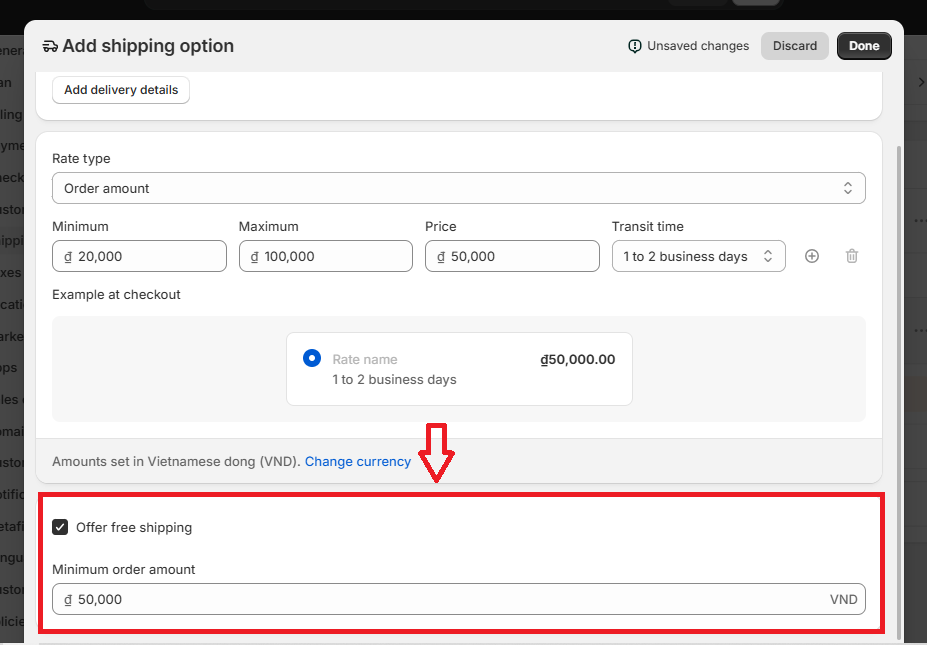
Unexpected shipping costs are one of the biggest reasons customers abandon their carts. Instead of offering free shipping on every order, set a free shipping threshold to encourage larger purchases while reducing pricing surprises.
To set it up, go to Settings → Shipping and delivery, click Add shipping option (or edit an existing shipping option), then enable “Offer free shipping” and enter a Minimum order amount (for example, $50). Customers whose order meets or exceeds that amount will automatically qualify for free shipping.
Once you’ve configured the threshold, promote it using your announcement bar, cart drawer, or cart page (for example, “Free shipping on orders over $50”). Letting shoppers know about the offer before they reach checkout can encourage them to complete or even increase their purchase.
Display Estimated Delivery Times
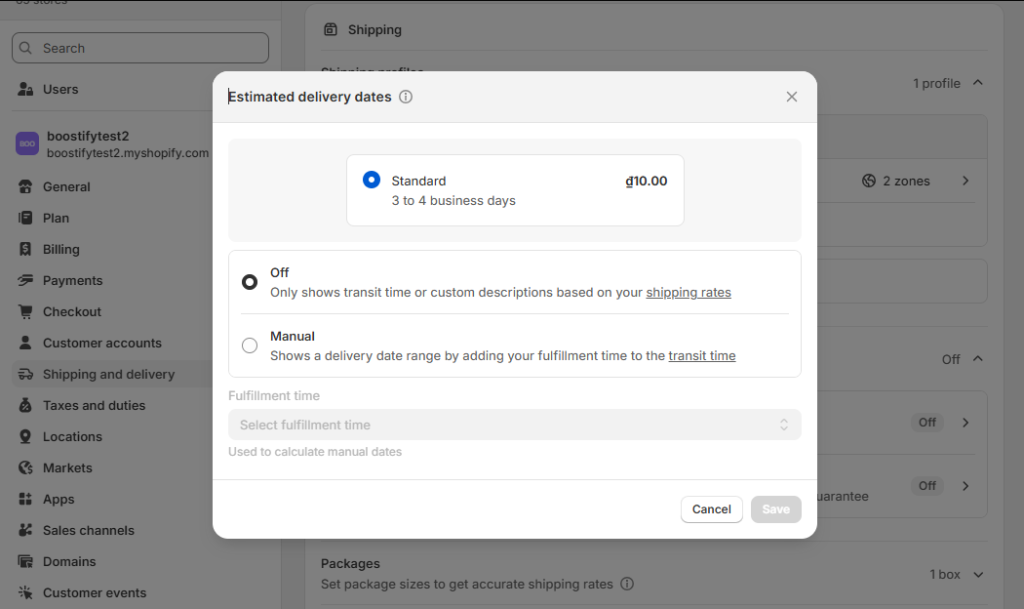
Letting customers know when their order is expected to arrive helps reduce uncertainty before checkout. Shopify now includes a built-in Estimated delivery dates feature, allowing eligible stores to display an estimated delivery window without installing a separate app.
To enable it, go to Settings → Shipping and delivery → Estimated delivery dates, switch it on, and configure your fulfillment time. Shopify will combine your fulfillment time with each shipping option’s transit time to calculate an estimated delivery date automatically.
Make Return & Refund Policies Easy to Find
Don’t make customers search for your store policies. Add clear links to your Return Policy, Refund Policy, and Shipping Policy in your footer, product pages, or cart so shoppers can quickly find the information they need before placing an order.
Display Contact Information
Make it easy for customers to contact you before placing an order. Display your Contact Page, customer support email, phone number (if available), or live chat in prominent locations such as your product pages, cart, and footer.
When shoppers can quickly find help with questions about shipping, sizing, or returns, they’re less likely to leave your store without completing their purchase
FAQs
What is a good Shopify abandoned cart rate?
There’s no universal benchmark because cart abandonment varies by industry, device, and customer behavior. However, according to the Baymard Institute, the average online cart abandonment rate is around 70%, meaning roughly 30% of shoppers complete their purchase.
If your store’s abandonment rate is significantly higher than the industry average, it’s worth reviewing your shopping experience for common friction points, such as unexpected shipping costs, a complicated checkout process, slow page speed, or a lack of trust signals.
Are Shopify abandoned checkout emails free?
Yes. Shopify includes native abandoned checkout emails on eligible plans, so you don’t need to install a separate email recovery app for basic cart recovery. You can customize the email content, branding, and send timing directly from your Shopify admin.
If you need advanced automation, customer segmentation, or multi-step recovery sequences, a dedicated email marketing platform may be worth considering. For many small and medium-sized stores, however, Shopify’s built-in recovery emails are sufficient.
Should I offer discount codes in abandoned cart emails?
Not necessarily. Discounts can recover some abandoned checkouts, but offering them too frequently may train customers to leave their cart in hopes of receiving a coupon.
A good approach is to send your first recovery email without a discount, simply reminding customers about the items they left behind. If you decide to offer a discount, reserve it for high-value customers, first-time buyers, or a later follow-up email rather than making it your default strategy.
Does Shop Pay reduce cart abandonment?
It can. Shop Pay allows returning customers to check out using their saved shipping and payment information, reducing the number of manual steps required to complete a purchase. This is particularly beneficial for mobile shoppers, where long checkout forms often contribute to abandonment.
However, Shop Pay isn’t a standalone solution. It works best alongside a streamlined shopping experience, transparent pricing, and a simple checkout process.
Is a cart drawer better than a cart page?
It depends on what you sell.
A cart drawer generally works better for stores where customers browse and add multiple products because it lets them review their cart without leaving the current page. This creates a smoother shopping flow and can encourage additional purchases.
A cart page may be the better choice if your products require customization, customers frequently add order notes, or they need to review detailed shipping or pricing information before checking out.
If your theme supports both options, test each experience and compare metrics such as cart abandonment rate, checkout completion rate, and conversion rate to determine which performs better for your store.
For a final word,
Reducing Shopify abandoned carts isn’t about installing more apps—it’s about removing friction. Before adding another tool, review your theme features and Shopify’s built-in settings. A faster checkout, clearer information, and a more trustworthy shopping experience can help more customers complete their purchases.
Before spending money on another app, take 30 minutes to audit your store. The features you already have may be enough to recover more sales.