
Present organized text-based content in a clean and minimal list layout. Use this section to display events, schedules, announcements, features, or structured information with clear visual hierarchy and spacing. Flexible alignment and spacing controls allow the layout to adapt to editorial, promotional, or informational content styles. Create a refined browsing experience focused on readability and simplicity.
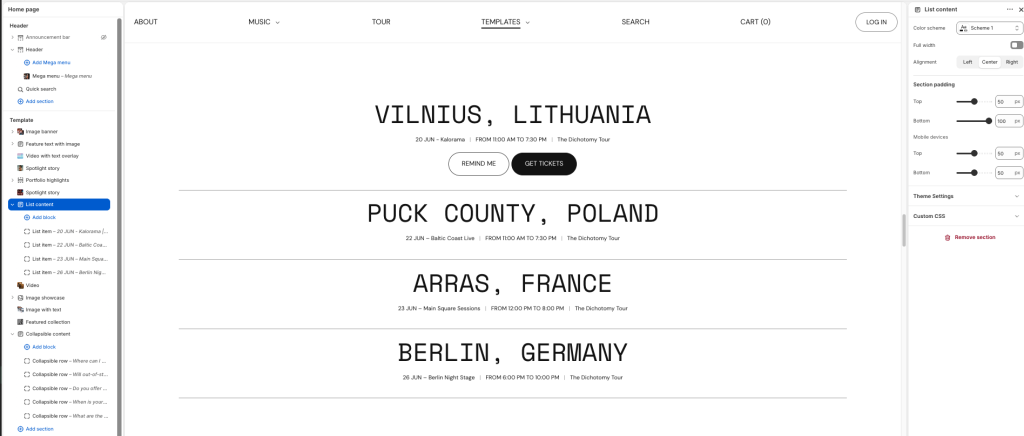
Color scheme: Select a color palette for the section background and content.
Full width: Expand the section to fill the full width of the screen.
Alignment: Choose the horizontal alignment of the list content.
Section padding
Top: Adjust the top spacing of the section on desktop devices.
Bottom: Adjust the bottom spacing of the section on desktop devices.
Mobile devices
Top: Adjust the top spacing of the section on mobile devices.
Bottom: Adjust the bottom spacing of the section on mobile devices.
List item
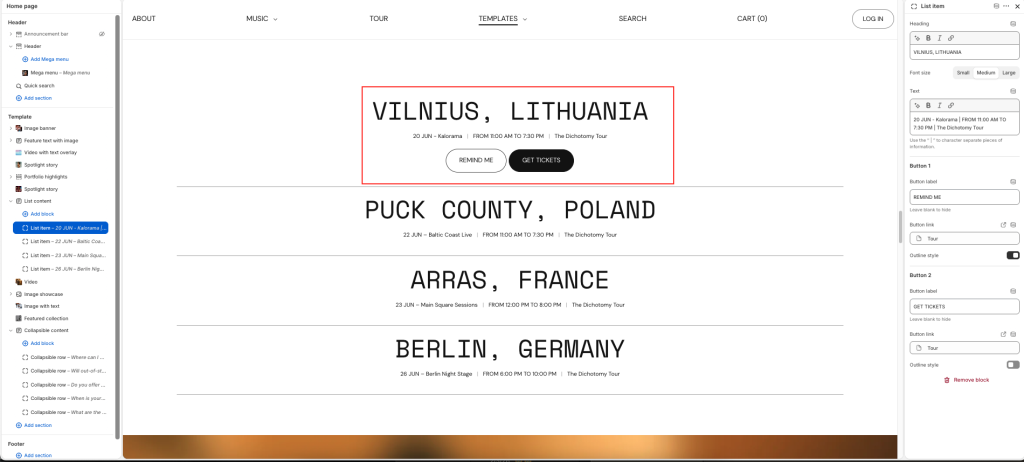
Heading: Display the main title or primary content for the list item.
Font size: Adjust the heading text size.
Text: Enter supporting details or additional information for the item. Use the “|” character to separate pieces of information.
Button 1 and Button 2
Button label: Add text for the first action button. Leave blank to hide.
Button link: Choose a destination link for the button.
Outline style: Display the button with an outlined visual style.