
Display oversized highlight typography combined with imagery to create bold and immersive visual storytelling. Layer large-scale text, supporting content, and media to emphasize featured messages, campaigns, or editorial moments. Flexible typography and layout controls allow the section to adapt to a wide range of creative styles. Create striking compositions that balance strong visual impact with readable content.
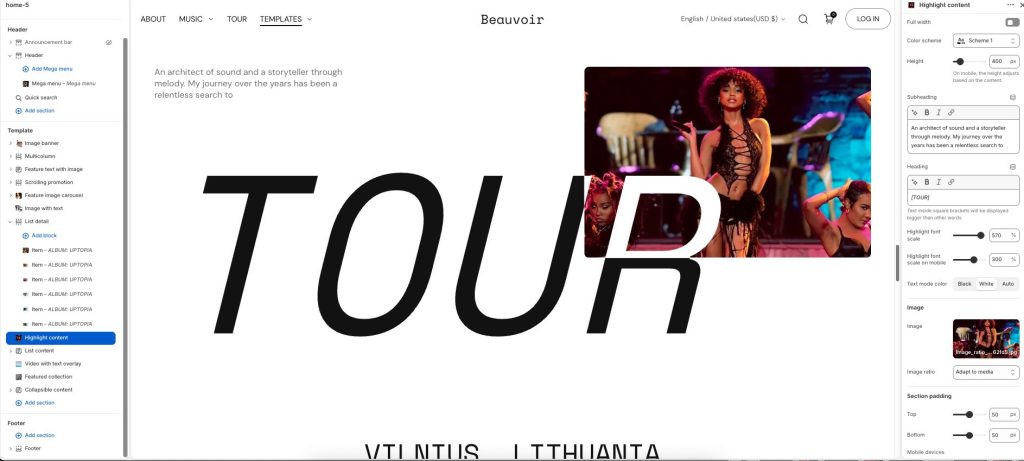
Full width: Expand the section to fill the full width of the screen.
Color scheme: Select a color palette for the section background and content.
Height: Adjust the height of the section layout. On mobile devices, the height adapts based on the content.
Subheading: Add a short supporting label or introductory text.
Heading: Display the main highlighted title or featured message. Text inside square brackets will appear larger than other words.
Highlight font scale: Adjust the scale of the highlighted heading text on desktop devices.
Highlight font scale on mobile: Adjust the scale of the highlighted heading text on mobile devices.
Text mode color: Choose the color style applied to the highlighted typography.
Image
Image: Upload an image displayed alongside the highlighted content.
Image ratio: Adjust how the image is cropped and displayed within the layout.