
Display a video with overlay text in a dynamic, visually rich layout. Highlight important messages while keeping the focus on movement and atmosphere. This section is perfect for hero banners, featured campaigns, or immersive storytelling. Customize the content to match a wide range of creative styles.
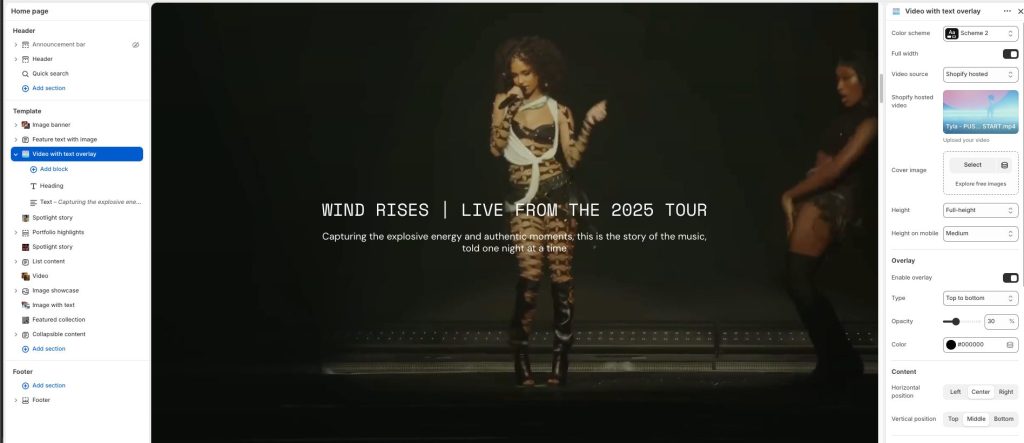
Color scheme: Select a color palette for the section background and content.
Full width: Expand the section to fill the full width of the screen.
Video source: Choose the source type for the video content.
Shopify hosted video: Upload or select a video hosted directly on Shopify.
Cover image: Add a preview image displayed before the video loads or a non-video.
Height: Adjust the height of the video section on desktop devices.
Height on mobile: Adjust the height of the video section on mobile devices.
Overlay
Enable overlay: Display a color overlay above the video content.
Type: Choose the overlay gradient direction or style.
Opacity: Adjust the transparency level of the overlay.
Color: Select the overlay color displayed above the video.
Content
Horizontal position: Choose the horizontal alignment of the overlay content.
Vertical position: Choose the vertical alignment of the overlay content.
Bottom navigation
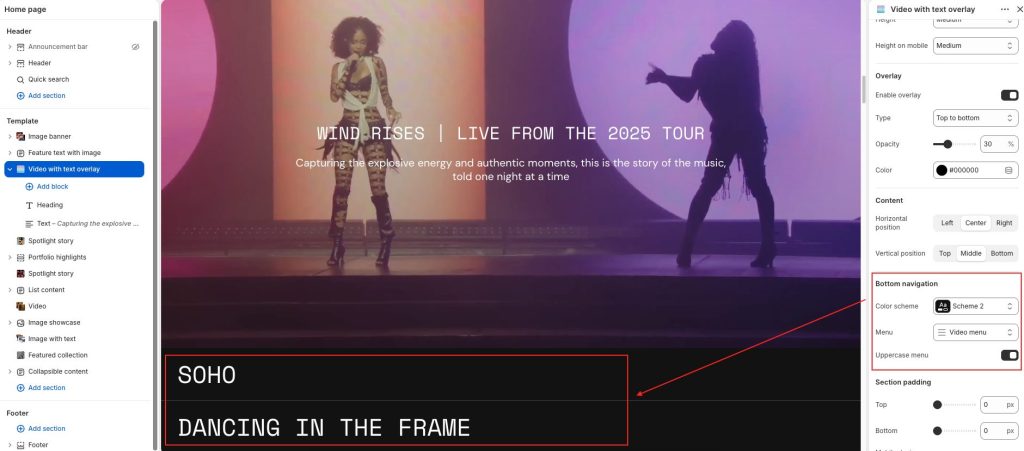
Color scheme: Select a color palette for the bottom navigation area.
Menu: Choose a menu displayed as the bottom navigation list.
Uppercase menu: Display menu items using uppercase typography.